Framer
Framer pricing 2026: Plans, AI credits and which plan do you actually need?

Free vs Basic vs Pro vs Enterprise, explained without the fluff.
If you've landed on Framer's pricing page and started doing mental math with CMS collections and bandwidth limits, you're not alone. I build and sell Framer templates for a living, so I get this question constantly from buyers before checkout: "Which plan do I actually need?"
Short answer: most people overthink it. Here's the version that actually helps you decide.
Framer Pricing at a Glance (2026)
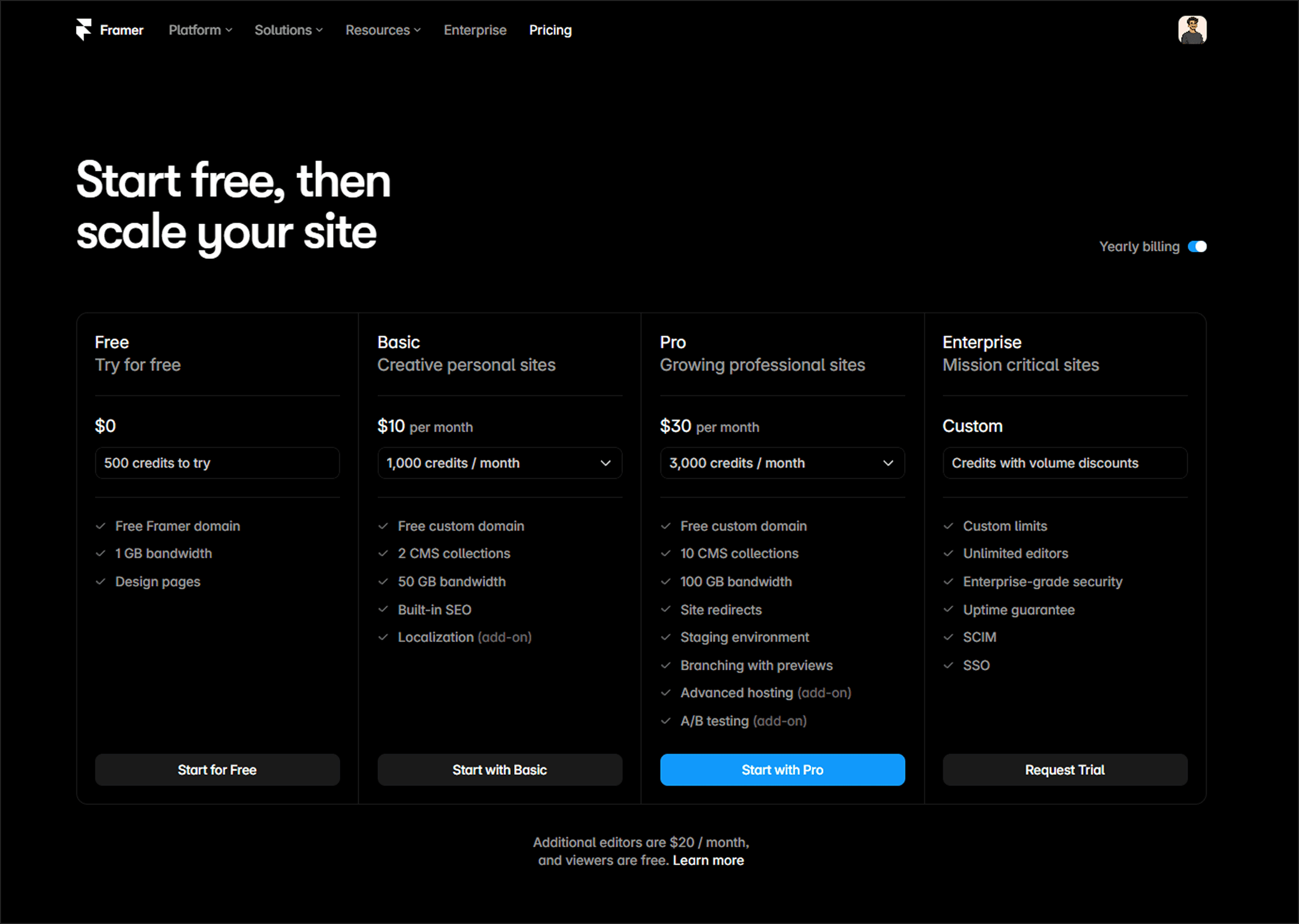
Monthly billing is available too, but it costs noticeably more than the yearly rate if you're committing to Framer for a real site. Yearly is the better deal.
Free Plan: Build First, Pay Later
Framer's Free plan gives you the full design editor, 10 CMS collections to experiment with, 1,000 pages, 5 MB file uploads, and one locale to test localization. You also get 500 AI credits a month to try Framer's Agents.
What you don't get is a custom domain. Your site lives on a Framer subdomain, which is fine for testing but not for a site you want to send clients or customers to.
My take: don't pay for anything until you've actually built something. Use Free to get a feel for the editor, try the CMS, break a few things. You'll know within a day or two whether Framer fits how you like to work. Once you're ready to put the site on your own domain, that's your cue to upgrade.
Basic Plan ($10/month): The Small-Site Plan
Basic gets you a free custom domain, 30 site pages, 2 CMS collections with up to 1,000 items, 50 GB of bandwidth, and built-in SEO tools. You also get 1,000 AI credits a month.
This is a solid plan for:
A portfolio site
A simple landing page
A small service business site with light content
Where Basic runs out of room: the CMS collection limit. Two collections sounds like plenty until you realize a blog is one collection, testimonials are another, and suddenly you're out of room before you've even added categories or FAQs. If your site is a single clean structure that isn't going to grow much, Basic is genuinely enough. If you're planning to publish content regularly, map out your CMS needs before you commit to this tier.
Pro Plan ($30/month): Where Framer Gets Serious
Pro is the plan most content-driven sites end up on. It includes 150 pages, 10 CMS collections, 2,500 CMS items, 100 GB bandwidth, and 3,000 AI credits a month.
The bigger unlock isn't just the higher numbers — it's the workflow features:
Site redirects — critical if you're changing URLs or migrating from another platform
Staging environment — test changes before they go live
Branching with previews — review work without touching the public site
None of that shows up when you're comparing plan cards side by side, but it's the difference between confidently publishing changes and holding your breath every time you hit save on a live site.
Who needs Pro: blogs, template stores, real estate sites, agency sites, anything with regular content updates or more than one person editing. If search traffic and content are part of your growth plan, Pro is where you stop working around plan limits and start just building.
Pro also has add-on room to scale further — up to 40 CMS collections, 40,000 CMS items, 700 pages, and 2 TB of bandwidth if you eventually need it.
Enterprise: Skip It Unless You Already Know Why
Enterprise gives you custom limits, unlimited editors, enterprise-grade security, SSO, SCIM, and an uptime guarantee. Pricing is custom — you talk to Framer's sales team directly.
If you have a genuine enterprise requirement, you already know it. Everyone else can make a confident call between Free, Basic, and Pro without Enterprise entering the conversation.
How Framer's AI Credits Actually Work
Since Framer rolled out Agents, credits have been the most confusing part of the pricing page. Here's the simple version:
Every workspace gets a shared monthly pool of AI credits based on plan — 500 on Free, 1,000 on Basic, 3,000 on Pro. Credits get used whenever an Agent does work for you: generating a page, restructuring CMS content, writing code components, translating copy. A small text edit uses very little. A full page build uses a lot more.
Credits reset monthly and don't roll over. If you hit your limit, credit-based tools pause until the reset — or you can buy more. If you're leaning on Agents heavily, it's worth tracking usage for a month before assuming you need a bigger add-on.
The Cost Most People Forget: Editor Seats
The plan price is just the site cost. If anyone else needs edit access, that's extra:
Viewers — free
Content editors (CMS, localization, on-page editing only) — $10/month per seat
Full editors (design + everything) — $20/month per seat
For a solo creator, this doesn't matter. For a client project or a small team, it adds up fast — a Pro site plus two full editors is $30 + $40 = $70/month, not $30. Budget for this before you quote a client, not after.
Other Add-Ons Worth Knowing About
Localization — $20 per additional locale
Convert (A/B testing) — $50 per 500,000 tracked events
Advanced Hosting — $200/month, for multi-site setups under one domain with custom headers
Most sites never touch these on day one. Treat them as a growth lever, not a default — get the core site working first, then add capacity for the specific limit you're actually hitting.
Basic vs Pro: The Real Decision
Feature | Basic | Pro |
|---|---|---|
Price (yearly) | $10/month | $30/month |
Pages | 30 | 150 |
CMS collections | 2 | 10 |
CMS items | 1,000 | 2,500 |
Bandwidth | 50 GB | 100 GB |
Redirects | ✗ | ✓ |
Staging | ✗ | ✓ |
AI credits | 1,000/month | 3,000/month |
If your site has one clear job and a small, fixed amount of content, Basic covers it. If you're publishing regularly, running a blog, or building something that's meant to grow — a template store, a real estate site, an agency site — Pro is the plan that gets out of your way instead of becoming something you're constantly working around.
Is Framer Good for SEO?
Yes — Framer includes built-in SEO tools (custom metadata, clean semantic output, fast global hosting) on every paid plan. There's no "SEO plan" you need to unlock. The reason content-heavy sites lean toward Pro isn't a ranking advantage; it's that redirects and staging make it much safer to keep improving a site without risking pages that are already ranking.
FAQ
Is Framer free to use? Yes. The Free plan includes the full design editor and CMS, but publishes to a Framer subdomain — no custom domain until you upgrade.
Which Framer plan is best for a blog? Pro, in almost every case. Basic's 2 CMS collections get tight fast once you add categories, authors, or related content alongside your posts.
Does Framer include hosting? Yes, hosting is included on every plan, including Free.
Can I use a custom domain on the Free plan? No. Custom domains start on Basic.
How much do extra editors cost on Framer? $20/month for a full editor, $10/month for a content editor (CMS and content-only access). Viewers are always free.
Can I upgrade or downgrade my Framer plan later? Yes, at any time. Your site and content stay intact when you switch tiers.
My Recommendation
Start on Free if you're still figuring out whether Framer fits your workflow. Move to Basic once you need a real domain and your content structure is simple. Go straight to Pro if the site is part of how you actually market or sell — a blog, a store, client work, or anything you'll keep publishing to.
And if you'd rather start from a site that's already built for conversion instead of a blank canvas — browse my Framer templates. Every one is built to be customized, not just filled in.
Pricing changes over time — always confirm current numbers on Framer's official pricing page before you buy.